|
Maestro - Midi Player Tool Kit for Unity Version 2.22.0
|
|
Maestro - Midi Player Tool Kit for Unity Version 2.22.0
|
Represents a MIDI event used throughout MPTK. This class is central to script-based MIDI workflows in components such as MidiStreamPlayer, MidiFilePlayer, MidiFileLoader, and MPTKWriter. More...
Public Types | |
| enum | EnumLength |
| Musical note-length categories for note duration: Whole, Half, Quarter, Eighth, Sixteenth. See https://en.wikipedia.org/wiki/Note_value. | |
Event Type and Message Data | |
Core MIDI event identity and associated message data. This section defines what the event is (Command) and the data fields interpreted from that command (Controller, Meta, Info, Value). It is the primary model used by playback, serialization, and filtering logic. | |
| MPTKCommand | Command |
| MIDI command type for this event. See MPTKCommand (NoteOn, ControlChange, PatchChange, etc.). | |
| MPTKController | Controller |
| Controller code when Command is #MPTKCommand.ControlChange (for example modulation, pan, bank select). The associated controller value is stored in Value. | |
| MPTKMeta | Meta |
| Meta-event type when Command is #MPTKCommand.MetaEvent (for example Lyric, TimeSignature, SetTempo). Related meta message data is stored in other fields (such as Value or Info). | |
| string | Info |
| Text message data for meta events (for example TextEvent or Lyric). | |
| int | Value |
| Numeric message data whose meaning depends on Command. | |
Note Playback Attributes | |
Parameters used to play and shape notes. These members describe how a note should be rendered: channel routing, velocity, note duration, and optional start delay. They are mainly used when Command is NoteOn/NoteOff. | |
| long | Track |
| Track index of this event in the source MIDI file. Track 0 is the first track. This value is informational and does not affect playback behavior. | |
| int | Channel |
| MIDI channel from 0 to 15 (channel 9 is typically used for drums). | |
| int | Velocity |
| Note velocity (0 to 127) for #MPTKCommand.NoteOn and #MPTKCommand.NoteOff. | |
| long | Duration |
| Note duration in milliseconds when Command = #MPTKCommand.NoteOn. Set to -1 for an indefinitely sustained note (until explicit note-off). | |
| long | Delay |
| Delay in milliseconds before playing a note. Used only for #MPTKCommand.NoteOn and only in Core mode. | |
| int | Length |
| Duration in MIDI ticks when Command = #MPTKCommand.NoteOn. | |
Musical Position and Timing | |
Temporal position of the event in musical and real time. These values provide timeline context: tick-based position, measure/beat, index in the source stream, and real-time timing useful for diagnostics and synchronization. | |
| long | Tick |
| Event time in MIDI ticks (fraction of a beat) from the beginning of the MIDI file. This value is independent of tempo or playback speed. Not used by MidiStreamPlayer or MidiInReader (real-time sources). | |
| int | Measure |
| Measure (bar) where this event occurs. Computed from time-signature events when a MIDI file is loaded. By default the time signature is 4/4. | |
| int | Beat |
| Beat index inside the measure for this event. Present for all events, but musically most relevant for note events. Computed from time-signature events when a MIDI file is loaded. By default the time signature is 4/4. | |
| int | Index |
| Original index of this event in the loaded MIDI event list. | |
| long | CreateTime |
| UTC timestamp (DateTime ticks) captured when this event instance is created. Divide by 10,000 to convert to milliseconds. Replaces the former TickTime field. | |
| float | RealTime |
| Absolute event time in milliseconds from the start of the MIDI sequence. Accounts for tempo changes, but not for MidiFilePlayer.MPTK_Speed. Not used by MidiStreamPlayer or MidiInReader (real-time sources). | |
| long | LatenceTime [get] |
| Elapsed system time (DateTime.UtcNow.Ticks) since this event was created. Mainly useful for latency diagnostics. One DateTime tick equals 100 nanoseconds. | |
| long | LatenceTimeMillis [get] |
| Elapsed time in milliseconds since this event was created. Mainly useful for latency diagnostics. | |
Source and Runtime Context | |
Runtime metadata attached to the event during playback. Includes source/session identifiers, user tag, associated voices, and playback state (IsOver) for voice lifecycle tracking. | |
| uint | Source |
| Origin of the message. Contains MIDI input source ID for incoming MIDI events, otherwise 0. | |
| int | IdSession |
| Session identifier associated with this event. With MidiFilePlayer, this ID is unique per played MIDI session and is used by MPTK_ClearAllSound to stop only voices from that session when switching tracks. It can also be used in other components such as MidiStreamPlayer for custom grouping, but avoid overriding it while MidiFilePlayer manages playback. | |
| object | Tag |
| Free-form application tag associated with this event. | |
| List< fluid_voice > | Voices |
| Voices associated with a NoteOn event. Multiple voices can exist for one note (for example layered samples). | |
| bool | IsOver [get] |
| Indicates whether this event has finished playing (all associated voices are OFF). | |
Real-Time Generator Modifiers | |
Real-time SoundFont generator overrides at event level. These members and methods let you override generator values per event, both before note start and while voices are already playing. This enables expressive per-note timbre control in Maestro Pro. Per-generator modifiers associated with this event. Null when no modifier is defined.
| |
| GenModifier[] | GensModifier |
| list of synth modifier available. | |
| bool | ModifySynthParameter (fluid_gen_type genType, float value, MPTKModeGeneratorChange mode) |
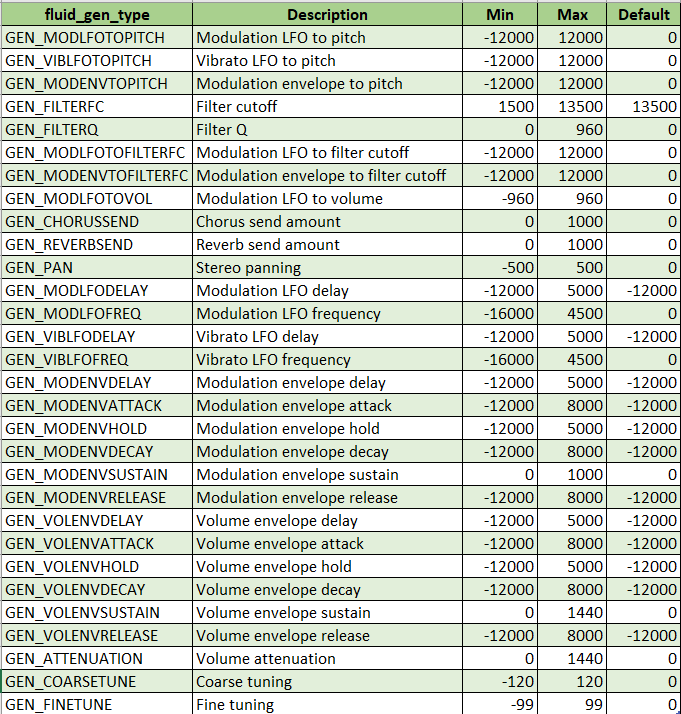
| Applies a modification to a SoundFont generator value. The change can be applied per note before playback and in real time while the note is playing. Each generator has a specific value range, see the generator list here. The input value for this method is normalized (between 0 and 1). See here for more details. . | |
| void | ClearSynthParameter () |
| Clears generator modifiers for this event and restores default SoundFont behavior. | |
Value Transposition | |
Utilities to transpose and restore note values safely. The original value is cached once, then reused so repeated calls apply transposition from the same base note instead of accumulating drift. | |
| int | OriginalValue [get] |
| Original (untransposed) value captured before calling TransposeValue. | |
| void | TransposeValue (int transpose) |
| Applies a transposition offset to Value. The first call stores the original value, then each call restores and reapplies the requested transpose amount from that original value. | |
| void | ResetTransposeValue () |
| Restores Value to the original untransposed value if available. | |
Constructors, Clone and Message Conversion | |
Creation, duplication, and MIDI packed-message conversion. This section contains constructors for default and packed MIDI input, cloning support, and conversion to/from compact MIDI data representation. | |
| MPTKEvent () | |
| Initializes a new MPTKEvent with default NoteOn-oriented values. Defaults: | |
| virtual object | Clone () |
| Dupplicate MIDI message. | |
| MPTKEvent (ulong data) | |
| Creates an MPTKEvent from a packed MIDI input message. | |
| ulong | ToData () |
| Builds a packed MIDI message from this MPTKEvent. Example: 0x00403C90 for NoteOn (90h), note 3Ch, velocity 40h. | |
Debug String Helpers | |
Human-readable formatting helpers for logs and diagnostics. Produces compact or detailed string representations of MPTKEvent to simplify debugging, tracing, and inspection during runtime. | |
| override string | ToString () |
| Builds a string description of this MIDI event. Since v2.83, returned strings no longer contain trailing end-of-line markers. For improved alignment in Debug.Log, enable a monospace font in the Unity console settings. | |
| string | ToStringBrief () |
| Builds a string description of this MIDI event. Since v2.83, returned strings no longer contain trailing end-of-line markers. For improved alignment in Debug.Log, enable a monospace font in the Unity console settings. | |
| string | ConvertToString (bool brief) |
| Builds a string description of this MIDI event. Since v2.83, returned strings no longer contain trailing end-of-line markers. For improved alignment in Debug.Log, enable a monospace font in the Unity console settings. | |
Generator Query Utilities | |
Read-only helpers for modifiable generator metadata and values. Provides access to default/current normalized generator values, generator labels, and the list of generators that support runtime changes. | |
| float | GetSynthParameterDefaultValue (fluid_gen_type genType) |
| Gets the default value for a SoundFont generator. Each generator has a specific value range, see the generator list here. The returned value is normalized (between 0 and 1). | |
| float | GetSynthParameterCurrentValue (fluid_gen_type genType) |
| Gets the current value for a generator on this event. Each generator has a specific value range, see the generator list here. The returned value is normalized (between 0 and 1). | |
| static string | GetSynthParameterLabel (fluid_gen_type genType) |
| Gets the display label for a generator. | |
| static List< MPTKListItem > | GetSynthParameterListGenerator () |
| Gets the list of modifiable generators. Returns a list of MPTKListItem where: | |
Event Playback Control | |
Event-level playback actions for active notes. Contains direct control helpers such as StopEvent, which sends a matching NoteOff for this event when applicable. | |
| void | StopEvent () |
| If this event is a NoteOn, sends the corresponding NoteOff event. This is equivalent to sending a note-off to the synth, so the sound enters its release phase. Has an effect only for NoteOn events. | |
Tempo and Byte Conversion Helpers | |
Static helpers for tempo conversion and byte packing. Utility methods convert BPM to microseconds-per-quarter-note (and reverse), and provide low-level byte extraction/packing used by meta event data. | |
| static int | BeatPerMinute2QuarterPerMicroSecond (double bpm) |
| Converts beats per minute (BPM) to microseconds per quarter note. Example: BPM=120 gives 500000 microseconds per quarter note. | |
| static double | QuarterPerMicroSecond2BeatPerMinute (int microsecondsPerQuaterNote) |
| Converts microseconds per quarter note to beats per minute (BPM). Example: 500000 microseconds per quarter note gives BPM=120. | |
Represents a MIDI event used throughout MPTK. This class is central to script-based MIDI workflows in components such as MidiStreamPlayer, MidiFilePlayer, MidiFileLoader, and MPTKWriter.
The key property is Command. The meaning of other fields (for example Value) depends on the selected MIDI command type.
Typical use cases:
Related components:
More information:
Example with MidiStreamPlayer:
| MidiPlayerTK.MPTKEvent.MPTKEvent | ( | ) |
Initializes a new MPTKEvent with default NoteOn-oriented values. Defaults:
| MidiPlayerTK.MPTKEvent.MPTKEvent | ( | ulong | data | ) |
Creates an MPTKEvent from a packed MIDI input message.
| data | Packed MIDI message data. |
| void MidiPlayerTK.MPTKEvent.TransposeValue | ( | int | transpose | ) |
Applies a transposition offset to Value. The first call stores the original value, then each call restores and reapplies the requested transpose amount from that original value.
| transpose | Semitone offset to apply. |
| ulong MidiPlayerTK.MPTKEvent.ToData | ( | ) |
Builds a packed MIDI message from this MPTKEvent. Example: 0x00403C90 for NoteOn (90h), note 3Ch, velocity 40h.
|
static |
Converts beats per minute (BPM) to microseconds per quarter note. Example: BPM=120 gives 500000 microseconds per quarter note.
| bpm | Beats per minute (assuming one beat = quarter note). |
|
static |
Converts microseconds per quarter note to beats per minute (BPM). Example: 500000 microseconds per quarter note gives BPM=120.
| microsecondsPerQuaterNote | Microseconds per quarter note. |
| override string MidiPlayerTK.MPTKEvent.ToString | ( | ) |
Builds a string description of this MIDI event. Since v2.83, returned strings no longer contain trailing end-of-line markers. For improved alignment in Debug.Log, enable a monospace font in the Unity console settings.
| string MidiPlayerTK.MPTKEvent.ToStringBrief | ( | ) |
Builds a string description of this MIDI event. Since v2.83, returned strings no longer contain trailing end-of-line markers. For improved alignment in Debug.Log, enable a monospace font in the Unity console settings.
| string MidiPlayerTK.MPTKEvent.ConvertToString | ( | bool | brief | ) |
Builds a string description of this MIDI event. Since v2.83, returned strings no longer contain trailing end-of-line markers. For improved alignment in Debug.Log, enable a monospace font in the Unity console settings.
| bool MidiPlayerTK.MPTKEvent.ModifySynthParameter | ( | fluid_gen_type | genType, |
| float | value, | ||
| MPTKModeGeneratorChange | mode ) |
Applies a modification to a SoundFont generator value. The change can be applied per note before playback and in real time while the note is playing.
Each generator has a specific value range, see the generator list here.
The input value for this method is normalized (between 0 and 1). See here for more details.
.
| genType | Type of generator to modify. Not all generators support real-time updates.
|
| value | Normalized value for the generator between 0 and 1. See the actual value range for each parameter here.
|
| mode | Defines how the value is applied.
|
| float MidiPlayerTK.MPTKEvent.GetSynthParameterDefaultValue | ( | fluid_gen_type | genType | ) |
Gets the default value for a SoundFont generator.
Each generator has a specific value range, see the generator list here.
The returned value is normalized (between 0 and 1).
| genType | Generator type. See ModifySynthParameter. |
|
static |
Gets the display label for a generator.
| genType | Generator type. See ModifySynthParameter. |
| void MidiPlayerTK.MPTKEvent.StopEvent | ( | ) |
If this event is a NoteOn, sends the corresponding NoteOff event. This is equivalent to sending a note-off to the synth, so the sound enters its release phase. Has an effect only for NoteOn events.
| int MidiPlayerTK.MPTKEvent.Value |
Numeric message data whose meaning depends on Command.
| long MidiPlayerTK.MPTKEvent.Duration |
Note duration in milliseconds when Command = #MPTKCommand.NoteOn. Set to -1 for an indefinitely sustained note (until explicit note-off).
| int MidiPlayerTK.MPTKEvent.Length |
Duration in MIDI ticks when Command = #MPTKCommand.NoteOn.
Tick duration is converted to milliseconds (Duration) when a MIDI file is loaded.
|
get |
Elapsed system time (DateTime.UtcNow.Ticks) since this event was created. Mainly useful for latency diagnostics. One DateTime tick equals 100 nanoseconds.
|
get |
Elapsed time in milliseconds since this event was created. Mainly useful for latency diagnostics.
 1.16.1