Create Your First Beast
This page is the shortest path from an empty Unity scene to a generated Creature Kit Beast.
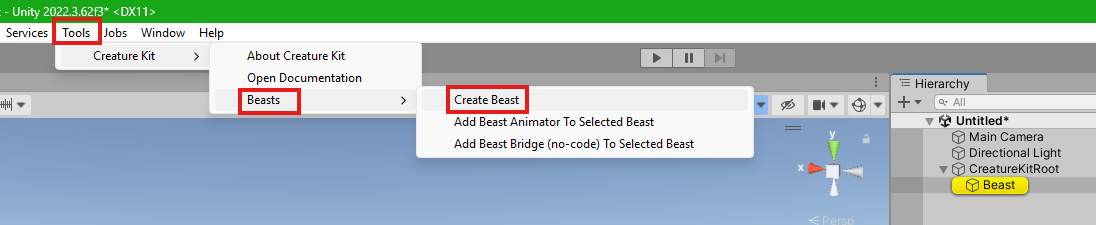
Create The Beast
In Unity, use one of these menus:
Tools > Creature Kit > Beasts > Create Beast
or:
GameObject > Creature Kit > Beasts > Create Beast
Creature Kit creates a new GameObject named Beast, adds BeastStructure, BeastSurface, and BeastAnimator, applies the default structure and surface presets, rebuilds the generated structure, and selects the new object in the Hierarchy.
If a GameObject is selected in the Hierarchy, the Beast is created under it. If nothing suitable is selected, Creature Kit creates or reuses a CreatureKitRoot object and places the Beast in front of the main camera when possible.
First Things To Try
- Select the
BeastGameObject. - In the
BeastStructureinspector, open thePresetsfoldout. - Apply a Structure preset.
- In the
BeastSurfaceinspector, apply a Surface preset. - Click
RebuildinBeastStructureif the generated structure needs refreshing.
At this point you have a generated creature with a ready-to-use BeastAnimator. You do not need a demo controller just to create and edit a Beast shape.
Use Animation
New Beasts include BeastAnimator with Idle selected as the initial animation. When you want to tune or replace the animation component, select the Beast in the Hierarchy and use:
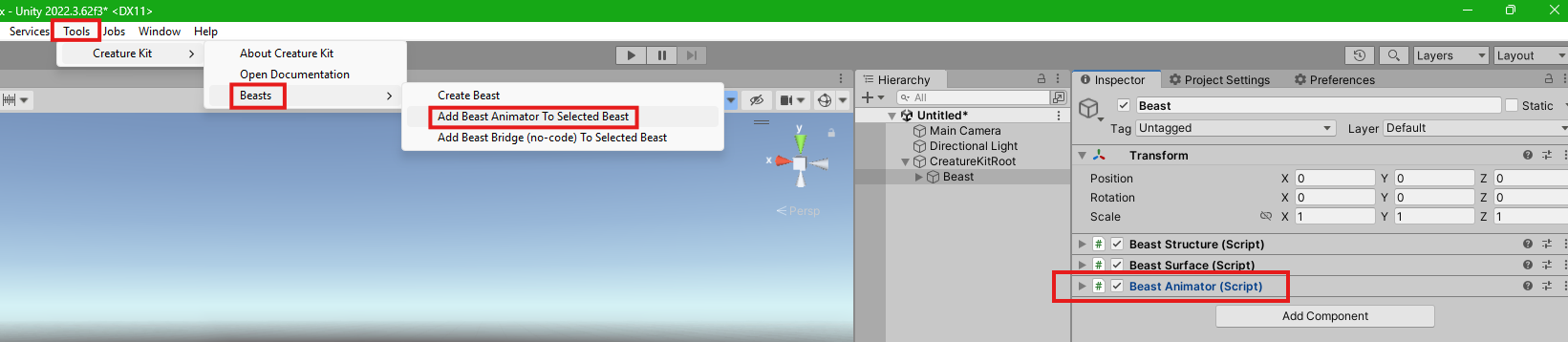
Tools > Creature Kit > Beasts > Add Beast Animator To Selected Beast
or:
GameObject > Creature Kit > Beasts > Add Beast Animator
This adds a BeastAnimator component to the selected Beast. If the component already exists, Creature Kit selects it instead of adding a duplicate.
Use BeastAnimator for Beast clips such as Idle, Walk, Rush, Search Run, Wait, Stunned, Takeoff, and Landing, plus procedural channel animation and direct channel poses.
For no-code workflows, use:
Tools > Creature Kit > Beasts > Add Beast Bridge (no-code) To Selected Beast
This adds BeastAnimationBridge and also adds BeastAnimator if it is missing.
Support Versions
Creature Kit includes plain text version files that can be opened even when Unity scripts do not compile:
Assets/CreatureKit/VERSION.txt
Assets/CreatureKit/Beasts/VERSION.txt
When asking for support, include these files or copy their contents. They identify the installed Core version, creature package version, compatibility range, documentation link, website, and Discord entry point.
Next
Read What Was Created to understand the scene object, generated hierarchy, and inspector sections.