Rendering And URP
Creature Kit Beast surfaces are shipped with materials based on Universal Render Pipeline/Lit.
This means the Beast materials are designed for Unity projects using URP. Creature Kit does not, however, require the user project to use a Creature Kit render pipeline asset.
Product Decision
Creature Kit does not install or assign a render pipeline asset in the user project.
This is intentional:
- existing Unity projects often already have their own URP asset;
- replacing the project render pipeline would be intrusive;
- render pipeline settings belong to the application, not to the creature package;
- Creature Kit should provide compatible materials, not take ownership of the host project's rendering setup.
The package may include demo scenes and demo lighting, but the core Beast package does not require a dedicated Creature Kit render pipeline asset.
Required Package
For the provided Beast materials to render correctly, the Unity project must have Universal Render Pipeline installed.
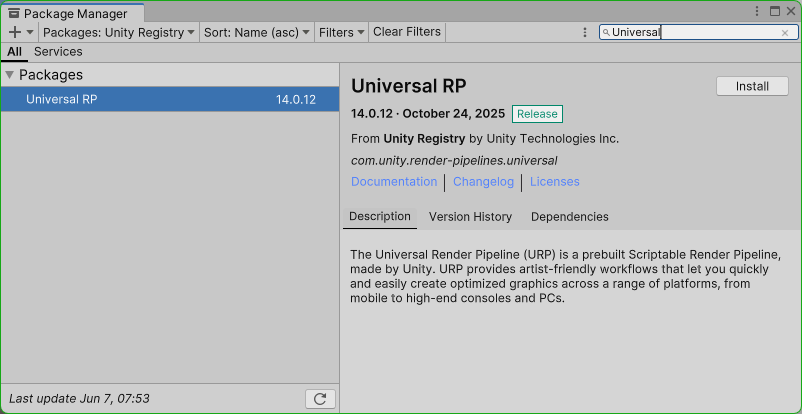
In Unity:
- Open
Window > Package Manager. - Search for
Universal RPorUniversal Render Pipeline. - Install the package if it is missing.
- Keep the project's existing URP asset if the project already has one.
If URP is missing, Unity may display materials as pink, gray, or otherwise incorrect because the Universal Render Pipeline/Lit shader is not available.
Existing Projects
When importing Creature Kit into an existing URP project, do not replace the project's render pipeline asset just for Creature Kit.
Use the project's existing URP setup. Creature Kit Beast surfaces only need URP-compatible shaders and materials; they do not need a specific URP asset.
Non-URP Projects
Built-in Render Pipeline and HDRP projects are not the primary target for the included Beast materials.
In those projects, users can still use Creature Kit structure and animation, but they should provide their own compatible materials or convert the Creature Kit materials to their rendering pipeline.
Official material conversion tools may be added later. For now, the supported default rendering path is URP.