Inspector Workflow
The Beast inspector is the main authoring tool for structure.
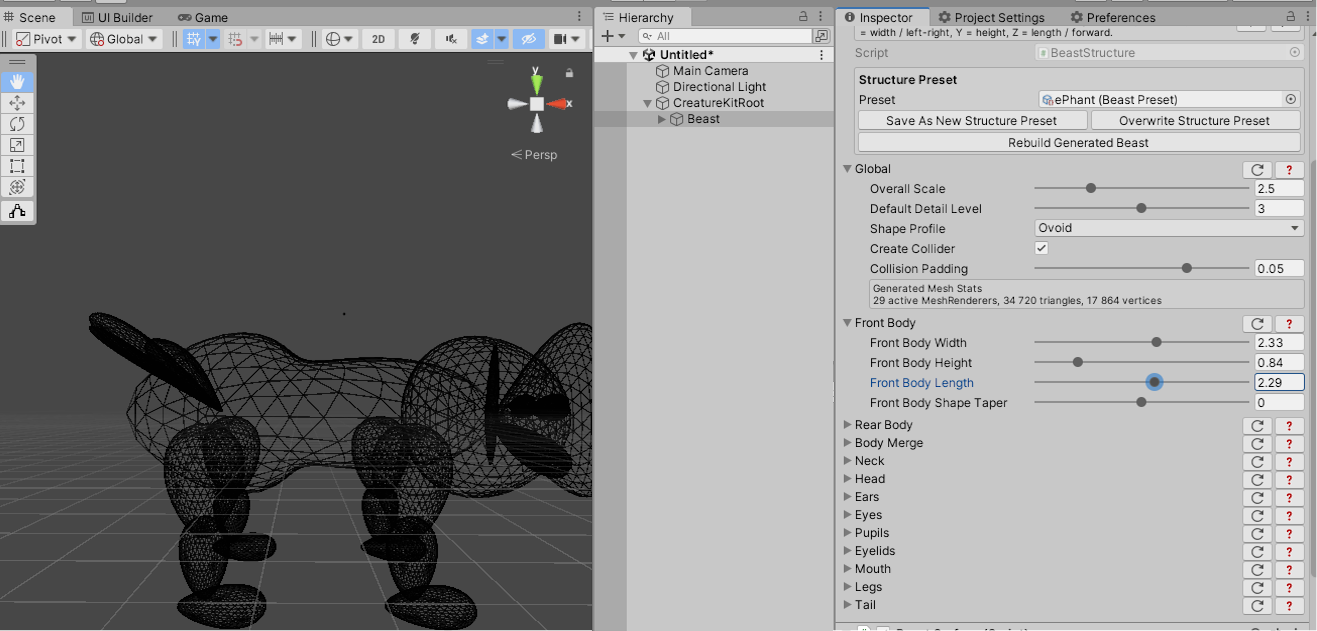
Base Structure
The Base Structure section contains settings that affect the whole generated Beast:
- overall scale;
- default detail level;
- global shape profile;
- shared collision options.
Part Sections
Each part family has its own inspector section. Use these sections to tune dimensions, counts, placement, protrusion, orientation, taper, and part-specific shape options.
Part-specific settings override or refine the global shape where the Beast supports it. This allows a creature to mix soft organic parts with stylized cube or tetrahedron parts.
Body Composition
Front Body and Rear Body are enabled by default. Their volumes are merged for the standard composite body.
Disable Rear Body to generate a simple body from the single Front Body volume. Disable Front Body to keep the two Rear Body lobes as separate, unmerged geometry. At least one body group remains enabled.
Body Shape and Body Detail apply to every composition. Rear Separation remains available for the two rear lobes, while Merge Smoothness applies only when Front Body and Rear Body are both enabled.
Front Body and Rear Body each provide independent Length Shape Taper and Height Shape Taper controls.
Rebuild
Some settings affect generated meshes or hierarchy. Use Rebuild Structure when the inspector indicates a rebuild is needed or when you want to force the generated structure to match the current settings.
Clear Generated Structure removes only the generated Beast hierarchy. It does not remove your application components.
Use the foldout header actions to reset a section, open section help, or keep the inspector compact while authoring. The structure inspector is designed for repeated tuning rather than one-time setup.