Ground Alignment Concepts
Ground alignment coordinates three different responsibilities: collision, movement, and visual orientation. Keeping these responsibilities separate is the key to a stable integration.
Upright Collision, Inclined Visuals
Unity's CharacterController uses an upright capsule. Tilting that capsule to match a slope can make collision resolution unstable and can introduce visible jitter.
BeastCharacterGroundAlignment therefore keeps the controller GameObject upright. It applies yaw to the controller root and applies slope pitch and roll only to the generated Beast visual root.
This produces two coordinate frames:
- the controller frame remains aligned with world up for collision and movement;
- the generated Beast visual frame follows the resolved ground normal.
Body And Legs Support Volume
Controller fitting uses the render bounds of the generated Body and Legs parts. Neck, Head, and Tail are excluded because decorative appendages must not move the locomotion center.
This distinction is important for unusual proportions. A long Cowraffe neck, for example, must not pull the fitted center forward and make the body float or sink differently depending on slope direction.
The orange Draw Body + Legs Center gizmo shows the center of these render bounds. It does not necessarily show the final CharacterController.center because automatic fitting can move the capsule center vertically.
The automatic fit uses the local X extent for the capsule radius and keeps the capsule bottom at the support bounds minimum. Unity requires a capsule's height to be at least twice its radius. A wide, low Beast can therefore produce a nearly spherical controller whose center is substantially above the orange bounds center. Automatic fitting should be treated as an initial gameplay envelope, not a precise collision hull for every body shape.
The visual rotation pivot is resolved separately from the generated foot references. Rotating near the stance limits the vertical arc described by the feet when the Beast inclines.
Ground Sampling
Each generated foot owns a GroundContact transform positioned once at its theoretical sole. Because this transform is a child of Foot, it follows Walk, Rush, and other leg animations without a per-frame renderer-bounds calculation.
Ground alignment samples only the external support feet. A one-pair Beast such as ShyMoon uses two rays. Beasts with two or more pairs use four rays, one below each left/right foot in the front and rear pairs. Intermediate feet are ignored because the component inclines one rigid visual root and cannot independently satisfy those contacts without IK.
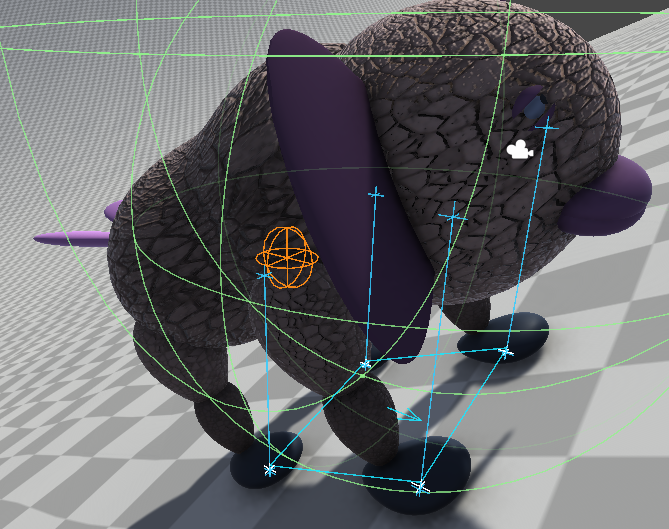
The external-foot impacts form the support polygon used to resolve the Beast's ground inclination.
Successful samples contribute according to their count:
- one impact supplies its resolved ground normal;
- two impacts add the inclination described by their contact line;
- three or four impacts add the plane described by the support points.
The resulting normal is smoothed and limited by Max Ground Tilt Angle. There is no center or CharacterController-radius fallback. When all foot rays miss temporarily, the component preserves its last valid orientation. This matters when an animation lifts the sampled feet.
Ground Normals
The normal source depends on the collider type:
TerrainCollider: the component samples the interpolatedTerrainDatanormal;- readable
MeshCollider: the component interpolates the mesh vertex normals at the hit triangle; - other colliders or unavailable mesh data: the component uses
RaycastHit.normal.
The debug view distinguishes the raw hit normal, the resolved terrain or mesh normal, and the final blended normal used for alignment.
Movement Along Slopes
Locomotion velocity normally starts in the world horizontal plane. ProjectVelocityOnGround redirects that velocity onto the resolved ground plane while preserving horizontal speed.
The projected velocity can contain a signed vertical component. Gravity remains world-vertical and stays the responsibility of the application controller. Do not apply contact pressure along the opposite ground normal: on a slope, that vector contains a horizontal uphill component that can affect CharacterController movement.
Rigid Alignment Limit
Tilting one visual root can align the creature as a whole, but it cannot satisfy every foot contact on uneven ground. Individual feet can still float or intersect when:
- the terrain changes significantly within the stance;
- the slope is steep;
- the leg lengths or foot heights differ;
- an animation lifts or lowers individual feet.
This is expected rigid-alignment behavior, not a failure of foot IK. The probes measure support; they never move a leg or foot. Use the debug tools to distinguish an incorrect ground sample from the natural limit of rotating one visual root.